
I have a confession to make: I have not owned a desktop computer since 2007. While I bought my first laptop when I was still in the Army, I went back and forth for a few years until I began to travel constantly for work. When I relocated from Montreal to the Greater Toronto and Hamilton Area in 2007 I left my last desktops with a friend. I would still run servers from the home until 2014, but as far as my client PCs they have been portables (laptops, tablets, and hybrids) for nearly 18 years. I do not miss the desktop beasts one bit.
Here’s the problem… in the past eighteen years, most portable PCs have gone from having plenty of ports to… well, much less.
 Looking at the oldest laptop I still use (an HP EliteBook 8570w) it has a power adapter, 5 USB ports, DisplayPort, eSATA, Firewire, Ethernet, audio, and VGA ports… not to mention the SD-Card reader. All of this before I dock it into the proprietary dock, which expands on that tremendously. Of course, the downside to this was the portability factor… measuring 15” x 10” x 1.75”, and weighing nearly 10 lbs. (with the second hard drive and 32gb RAM).
My newest laptop is a Microsoft Surface laptop 4… with a proprietary power port, a single Thunderbolt (USB-C) port, a single USB 3 port, and an audio port. It is quite portable… measuring 13.4” x 9.6” x .6”, and weighing about 3 lbs. This is with 16gb of RAM… and of course there is no extra hard drive included.
With the older workstation laptops I was able to connect multiple external screens and devices without a problem. Today? Good luck with that!
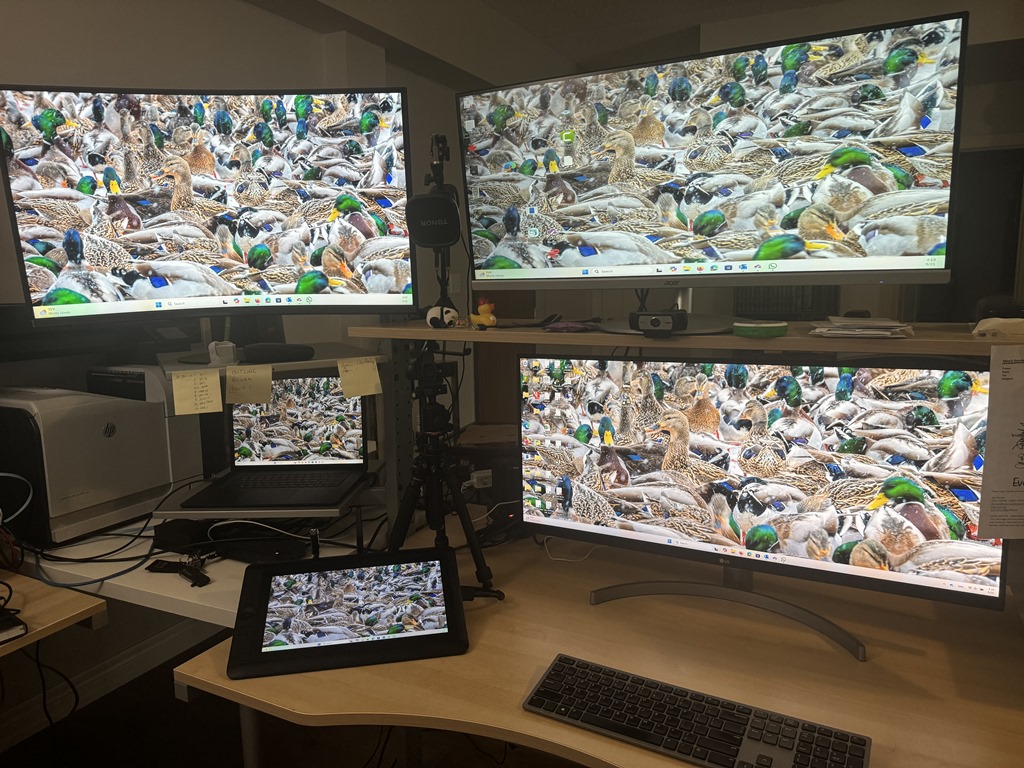
That is what port replicators and docking stations are for, right? Well let me ask you this… where am I going to find a dock that will run four external screens (including a digitizing monitor), two external cameras, an external boom microphone, as well as a number of external storage devices? You don’t know either, huh?
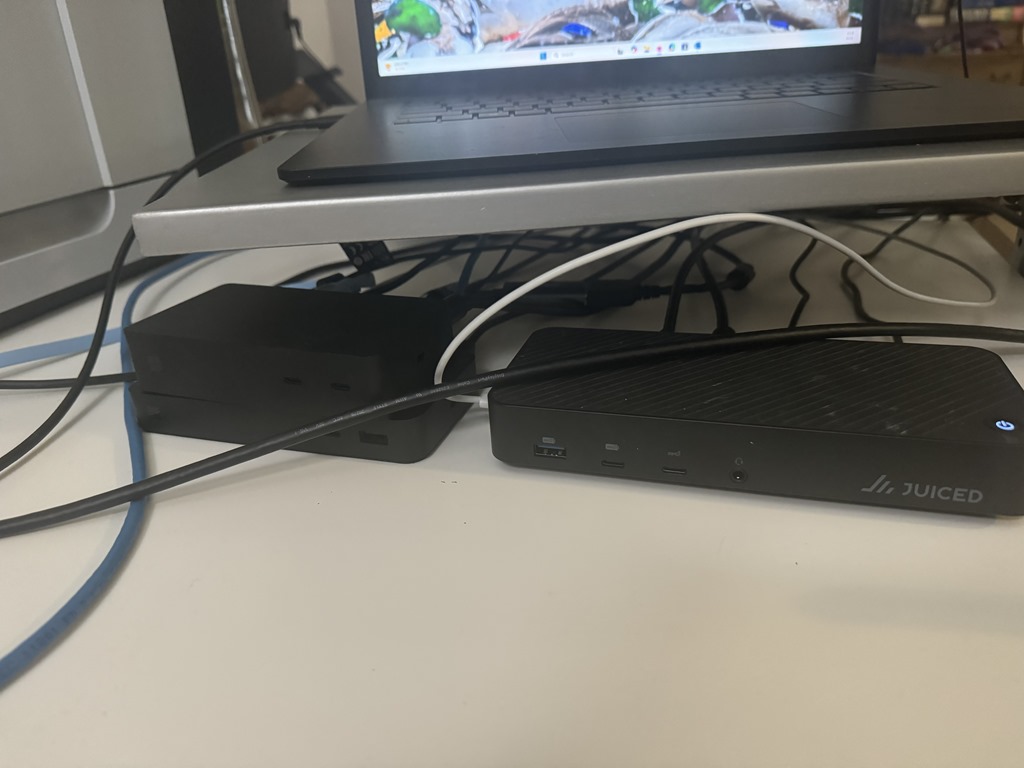 Let me share the secret of my vast expandability: when I am sitting at my desk at home with all of my devices connects I have three docks connected: One Microsoft Surface Dock 2 (which connects to the proprietary power port), one Microsoft Surface Thunderbolt 4 Dock (connected to the Thunderbolt port), and one third-party dock called the Juiced Systems Octone Dock (connected via USB-C to the Thunderbolt Dock). I could also connect it directly to the PC using the USB 3.1 port, but that’s another story.
When I head out on the road I simply disconnect the laptop and grab it with my external mouse and power supply. I might even grab my portable USB monitor, which will bring the total weight of my computer and external monitor to about 5 lbs., which is still lighter than the HP.
There are some caveats that I’ve encountered that I need to remember in order to run such a heavy load. My laptop’s USB ports only provide a small amount of power, and the docking stations (each of which could also provide power to the laptop) must be plugged into an external power source… and even that has caused me issues. When I started I was using an old power bar with plenty of plugs, but I am not sure that all of my devices were properly powered; I experienced a lot of off/on hiccoughs with it. Those were mostly resolved when I upgraded to a much better power bar (APC P11U2 Surge Protector with 11 power outlets and two USB ports, with a energy rating of 2880 Joules). I also have to be careful to divide the workload between the three docks… so two of my external monitors are connected to the Octane Dock, and the remaining two are connected by USB-C cable to the Surface Docks. Also, I make sure that the Digitizer’s USB connection and HDMI connection are connected trough the same dock.
Looking at the picture of the docks it is much more obvious that cabling is not my strong point than it is that there are three docks in the picture. Yes, they are all black and it is hard to tell that one is sitting atop the other… but they are all there, and they all sit under the rotating shelf on which my laptop sits. They do not have to look great… as long as they all work!
Of course, there is a serious cost involved to all this, and if I did not need such an elaborate configuration for my work then I would not have made the investment. In US Dollars the docks cost over $800… not to mention the fact that any electricity savings you might have enjoyed by downsizing your computer disappear. With that said, if you need the expandability but want to use a modern laptop, then the functionality is there. As I type this article I have the following connected to my laptop’s three ports:
- Three external monitors
- Wacom Display Digitizer
- Two external camera
- External boom microphone
- RJ-45 Ethernet cable (Internal network)
- Wi-Fi (external network)
- Console cable (Internal switch)
- Two external hard drives
- Bluetooth keyboard & mouse
- Yubikey
It took a lot of tweaking to get here but I am happy to say that I have the environment that works for me… whether I am working from home or on the road. There was a time when I would build or buy accessories just to brag that I had them. With this configuration I can honestly say that I need everything that is connected… or at least find it all extremely convenient for my work. Will things change around when I move? We’ll see… my setup has changed hundreds of times since I started blogging, and of course every time I move. I am pleased with my current environment… and glad that I am not still writing about what I carry in my backpack when I get onto a different plane every week.
 The World According to Mitch
Leave a comment